
Leaving a photo out takes it out
On plan review, leaving a photo out now updates the price and makes the video without that photo.

Recording
You hit record.
Record in the browser, or upload a recording you already have.
AI Director
The AI Director plans the scenes.
Your recording is cut into scenes with a narration script. Edit it by hand, or ask AI.
Camera
Camera moves punch in.
Punch in, drift or hold, so a flat capture feels deliberately shot.
Voice booth
A professional voice narrates.
The script you approved is read by a curated professional voice.
Music
Add background music.
Pick a track from the library; it plays under the narration and fits the length of your video.
Captions
Captions burn in.
Burned into the picture, with a WebVTT sidecar alongside.
Brand kit
Your brand lands.
Your logo and colours come from your brand kit, on or off per video.
Premiere
Your finished video premieres.
A 1080p MP4. Nothing renders until you approve the plan.
Every frame below came out of the pipeline: one raw screen recording in, a narrated, captioned, on-brand video out.
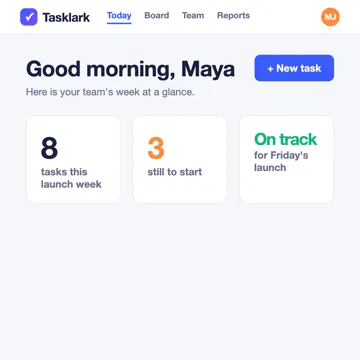
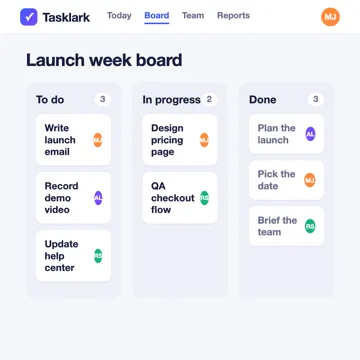
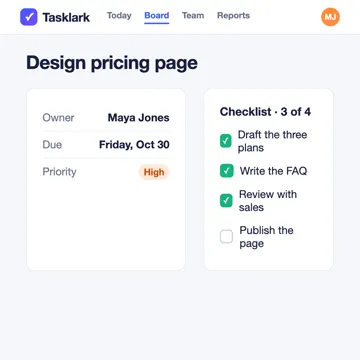
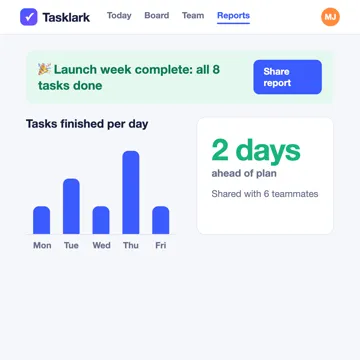
Tasklark is a team task planner: plan the launch week, move work across the board and share the report.
The finished video: the Tasklark report screen sits over a soft blurred copy of itself with the film look, a ring draws round "Launch week complete: all 8 tasks done", the narration appears as captions below the chart, and the closing card builds in with the Tasklark logo and "Plan your next launch week in Tasklark".
What changed in the studio lately, in plain words. Every feature, old and new, is on the Features page.
On plan review, leaving a photo out now updates the price and makes the video without that photo.
If our check stops a product video because of photos of people, the card now says which photos, so you can replace just those.
Cinematic, the default for screenshot videos, shows each screen with a panel for your words on widescreen and vertical videos, with gentle dissolves and slow camera moves where the picture allows. Prefer your screens whole, with straight cuts and no camera moves? Choose Simple when you start.
Your opening title reveals your logo and builds in, and your closing slide arrives as an end card, in motion that matches your video’s style. Plan review plays it first, one switch turns it off, and it costs the same credits.
Screen recording, screenshot, avatar and product videos share four looks: Clean and direct, Premium tech film, Informational and Creator style. Each sets the pace, the card motion and a matching music suggestion.
The labels that point at things in your video can draw in, lift in or pop in; you choose at plan review. Your words stay exactly where and when they were planned.
Every project starts from one of four kinds of material. Pick the one you already have, tell the Director what the video is for, and it plans the cut from there.
Record a software workflow in your browser or upload an existing recording for a narrated product demo.
Arrange product screenshots into a video plan, then review the script and how each screen is presented.
Choose an avatar presenter for your product story, with narration and supporting visuals you review before generation.
Build a product video from pictures and specifications, then review the product story and scene plan before approving.
A film crew compressed into a pipeline: you bring the product, My Feature Flow brings the director, editor, voice artist, and colorist.
Record a one-take walkthrough in the browser or upload a recording. No script, no editing pass — the footage is enough to start.
My Feature Flow reads your footage and transcript, then drafts a scene-by-scene edit: where to zoom, what to caption, when to cut, and what the narration should say.
Review the script and scene decisions before generation. Manual plan edits are not metered. AI-assisted revisions use credits. Narration and rendering start after you approve.
The narration, captions, camera moves and transitions you approved are composited into a crisp 1080p video you preview and download through a short-lived, secure link.
Purpose-built for product teams and marketers who need professional video at the pace they ship.
Record straight from your browser, with recordings uploaded in chunks as you go.
The Director watches your footage and makes real editorial calls: zooms, captions, cuts.
Keyframed camera moves punch in on clicks and menu opens, so a flat capture feels deliberately shot.
A studio-grade voice reads your approved script line by line, with captions to match.
Save your logo, colours, and default narration voice for use in your videos. Available brand assets and supported settings are applied during rendering.
Starting a video sets credits aside for it. Planning is paid from them before approval; after approval, narration and rendering are charged for actual use under your plan’s limits, and whatever the video does not use comes back.
No. You record your product or upload a screen recording, screenshots or product photos; the AI Director plans the cut, writes the script and places the zooms and captions. You read the plan, change what you like, and approve it.
Yes. The pipeline pauses at plan review so you can revise the narration, scene decisions, voice and pacing before anything renders. Manual plan edits are not metered. AI-assisted revisions use credits.
My Feature Flow does not use your recordings or rendered videos to train models. That commitment covers our own use, not a guarantee about every supplier’s training practices; see the Privacy Policy for the presenter supplier’s training caveat. Your footage is isolated to your account, and sign-in uses one-time email codes, not passwords.
A 1080p MP4 in the shape you choose, with the narration, subtitles, camera moves and branding you select in your approved plan. You preview and download it through a short-lived, secure link. Four formats are available on every plan: product demo, feature announcement, social clip and tutorial. Each finished video also comes with a YouTube description and a TikTok caption ready to paste, plus its spoken script when it has narration and subtitle files when it has subtitles.
Start free creates an account; it does not purchase the displayed plan. Your workspace’s Billing and Usage pages show your current plan, its limits and what you can buy.
Choose your monthly credits and see how many videos they can make.
Turn this week’s release into this week’s launch video.