
Software tutorial and onboarding videos from a screen recording
Record the workflow once. The AI Director writes a step-by-step narration and plans the zooms and highlights, and you approve it before it renders.
A three-step tutorial, made from one recording
A 34-second recording of booking a room in Bookwren, a made-up booking app. The video walks through each step, zooms to every click, labels the moment the booking lands and burns in the captions; the subtitle file comes with it.
What went in
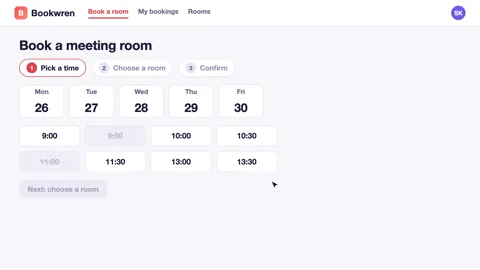
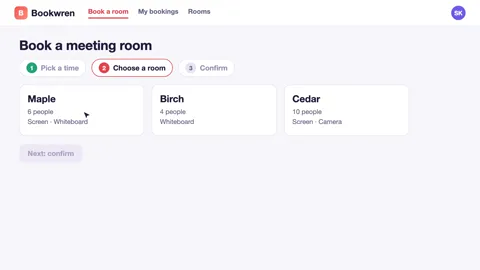
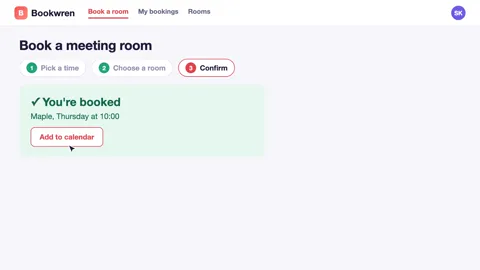
Three frames of the 34-second recording that went in: no voice, no captions, no zoom.
Bookwren books meeting rooms: pick a time, choose a room and confirm in three steps.
What came out
Made in My Feature Flow on a paid plan, from a made-up product.
Built for walkthroughs
The tutorial format
Choose the tutorial format and the plan paces the video step by step, following the order of your recording.
Captions and subtitle files
Captions can be drawn into the video, and the Videos page gives .srt and .vtt files for a player on your own help centre.
A narrator you choose
Pick a voice from the catalogue in your workspace and preview it before you approve.
Zooms that follow the clicks
Keyframed zooms and highlights keep the viewer on the button or field each step is about.
From one recording to a walkthrough
Bring your product
Record in a supported desktop browser, upload a WebM, MP4 or MOV recording, or add screenshots or product photos.
The AI Director plans the video
It writes the narration and plans each scene — the zooms, pans, highlights and captions — from what is on screen.
You review and approve
Edit the script and the scenes before anything is voiced or rendered. Manual plan edits are not metered. AI-assisted revisions use credits.
Render and download
Narration and rendering run after you approve, and the finished video is ready to download from your workspace.
Good to know
- This is for software walkthroughs made from your own screens, not filmed classroom or HR training.
- The Free plan gives you 160 credits to start, so you can try it, and Free videos carry a watermark.
Questions
Can I use the video in my help centre?
Yes. Download the video, and use the .srt and .vtt subtitle files with a player on your own site.
Can I make an onboarding video for new users?
Yes. Record the first steps a new user takes, choose the tutorial format, and edit the narration at plan review.
Do I need to narrate while I record?
No. The narration is written from what is on screen; anything you say is transcribed and can be used.
Turn your next walkthrough into a video
Record it once and approve the narrated plan before anything renders.